When you type a URL into your browser, something invisible happens before a single byte of webpage content loads. Your computer must translate that human-readable name into a machine-readable IP address—a process that typically completes in under 100 milliseconds but involves traversing a global hierarchy of servers spanning multiple continents.
The Domain Name System (DNS) is often called the “phonebook of the Internet,” but that analogy undersells its complexity. A phonebook is a static directory. DNS is a distributed database with over 1,500 root server instances worldwide, millions of domain records, and caching layers at every level—all designed to resolve billions of queries per day while maintaining consistency across a system that was architected in the 1980s.
Why DNS Exists: The Gap Between Human Memory and Network Addressing
IP addresses are how devices locate each other on a network. IPv4 addresses like 172.217.14.206 work perfectly for routers and servers, but humans struggle to remember more than a handful of numeric sequences. IPv6 makes this worse: 2607:f8b0:4004:800::200e is functionally identical from a machine’s perspective but far less memorable for people.
DNS bridges this gap by providing a hierarchical naming system. The domain www.example.com breaks into labels read right-to-left: com (top-level domain), example (second-level domain), and www (subdomain or hostname). This hierarchy mirrors the administrative structure of the Internet—no single organization manages all domains, but each level delegates authority downward.
The Four DNS Server Types and Their Distinct Roles
DNS resolution involves four categories of servers, each with a specific function in the lookup chain.
Recursive resolvers sit at the edge of the network, closest to end users. When your browser needs to resolve a domain, it queries the recursive resolver configured in your system (often provided by your ISP or a service like 1.1.1.1). The recursive resolver’s job is to chase down the answer through the entire DNS hierarchy if necessary, then cache it for future queries. This is the workhorse of the DNS system—it handles the complexity so clients don’t have to.
Root servers represent the starting point for all DNS lookups that cannot be answered from cache. Despite the name suggesting 13 physical machines, there are actually over 1,900 root server instances deployed globally using Anycast routing. Each instance responds to the same IP addresses, and the network routes your query to the geographically nearest one. The root servers don’t know the answer to your query—they know which servers are authoritative for each top-level domain.
TLD (Top-Level Domain) servers maintain information about domains within their zone. The .com TLD servers know which nameservers are authoritative for every .com domain. When a root server receives a query for example.com, it responds with a referral to the .com TLD servers rather than the final answer.
Authoritative nameservers hold the actual DNS records for specific domains. These are operated by domain registrars, hosting providers, or organizations running their own DNS infrastructure. An authoritative server for example.com can definitively answer queries about www.example.com’s IP address because it holds the zone file containing those records.

Image source: Cloudflare
The Resolution Process: Walking the Hierarchy
Consider what happens when you visit a domain that isn’t cached anywhere. Your browser asks the recursive resolver for the A record (IPv4 address) of www.example.com.
The recursive resolver first queries a root server. The root server doesn’t know www.example.com, but it knows which servers handle .com. It returns a referral—a list of .com TLD server addresses.
The resolver then queries one of those TLD servers. The TLD server doesn’t know www.example.com either, but it knows which nameservers are authoritative for example.com. It returns another referral, this time with the authoritative nameserver addresses.
Finally, the resolver queries the authoritative nameserver. This server does know the answer—it responds with the A record containing the IP address. The resolver caches this response (honoring the TTL value) and returns the answer to your browser.
sequenceDiagram
    participant Client
    participant Resolver
    participant Root
    participant TLD
    participant Auth
    Client->>Resolver: Query www.example.com
    Resolver->>Root: Query www.example.com
    Root-->>Resolver: Referral to .com TLD
    Resolver->>TLD: Query www.example.com
    TLD-->>Resolver: Referral to example.com NS
    Resolver->>Auth: Query www.example.com
    Auth-->>Resolver: A record: 93.184.216.34
    Resolver-->>Client: 93.184.216.34
This full resolution involves multiple round trips across the Internet. A query from New York to a domain hosted in Singapore might traverse servers in Virginia (root), California (TLD), and Singapore (authoritative). Yet it typically completes in under 200ms because of the caching infrastructure layered throughout the system.
Caching: The Multi-Layer Optimization That Makes DNS Fast
Without caching, DNS would collapse under its own weight. Every webpage load triggers dozens of DNS queries—for the main domain, CDN hosts, analytics services, fonts, APIs, and advertising networks. Caching at multiple levels prevents these queries from traversing the entire hierarchy each time.
Browser cache represents the first line of defense. Chrome, Firefox, and Safari all maintain internal DNS caches that store recent lookups. When you navigate to a page, the browser checks its own cache before asking the operating system. This cache is separate from HTTP cache and obeys DNS TTL values.
Operating system cache is the second layer. The OS resolver (often called a “stub resolver”) maintains its own cache and handles queries from all applications, not just browsers. On Windows, you can inspect this cache with ipconfig /displaydns; on Linux systems running systemd-resolved, use resolvectl query.
Recursive resolver cache is where the real efficiency gains appear. Public resolvers like Cloudflare’s 1.1.1.1 and Google’s 8.8.8.8 serve millions of users. When one user looks up google.com, the resolver caches the result. Subsequent queries from other users for the same domain are answered instantly from cache, bypassing the entire resolution chain.

Image source: Cloudflare
The Time To Live (TTL) value attached to each DNS record governs caching duration. A record with TTL=3600 can be cached for one hour. After that, the cached entry becomes stale and must be refreshed. This creates a fundamental tension: longer TTLs improve performance by extending cache lifetimes, but shorter TTLs enable faster propagation of changes.
The TTL Trade-off: Performance Versus Flexibility
TTL selection involves competing priorities that vary by use case.
For stable infrastructure records—domain nameservers, email servers, static website hosts—longer TTLs make sense. A 24-hour TTL (86400 seconds) means resolvers cache your records for a full day. This minimizes query load on your authoritative servers and improves resolution latency for users worldwide. Most domains use TTLs between 1 hour and 24 hours for standard records.
For records that change frequently—load-balanced services, failover configurations, CDN origins—shorter TTLs are necessary. A 60-second TTL allows rapid DNS-based failover: if a server fails, updating the DNS record propagates the change within a minute. But this comes at a cost: your authoritative servers handle far more queries, and users experience slightly higher latency on each uncached lookup.
Some services use extremely short TTLs (under 30 seconds) for maximum flexibility. This works for small-scale applications but becomes problematic at scale. Recursive resolvers may impose minimum TTL floors (often 5-10 minutes) to prevent cache thrashing. And a surge in queries from short TTLs can overwhelm authoritative servers during traffic spikes.
Recursive vs. Iterative Queries: Who Does the Work
DNS supports two query modes that differ in how much work each server performs.
In a recursive query, the client asks the server to perform the entire resolution. The server either returns the final answer or an error. This is what your browser sends to your configured recursive resolver—the resolver takes full responsibility for walking the hierarchy.
In an iterative query, the server returns whatever it knows and refers the client to another server for more information. This is what recursive resolvers use when communicating with root, TLD, and authoritative servers. Each server in the chain provides a partial answer rather than completing the full resolution.
This distinction matters for understanding DNS load distribution. A recursive resolver handling recursive queries from thousands of clients makes many iterative queries upstream. But those upstream servers never see the original client requests—they only interact with the recursive resolver, which acts as a proxy aggregating all client queries.
DNS Packet Structure: What Actually Traverses the Network
DNS messages follow a specific binary format defined in RFC 1035. Every query and response uses the same basic structure.
The header section occupies the first 12 bytes and contains several fields:
- Transaction ID (16 bits): Matches responses to queries
- Flags (16 bits): Includes QR (query/response), OPCODE (query type), AA (authoritative answer), TC (truncated), RD (recursion desired), RA (recursion available)
- Question count, Answer count, Authority count, Additional count: Indicate how many records follow in each section
The question section contains the domain name being queried and the record type (A, AAAA, MX, etc.). Domain names are encoded as a sequence of length-prefixed labels rather than null-terminated strings, enabling a compression technique called “pointer compression” that reduces packet size.
The answer section (in responses) contains the requested records. The authority section holds NS records pointing to authoritative servers. The additional section can contain supplementary records, such as A records for nameservers mentioned in the authority section (called “glue records”).
This packet structure has a fundamental limitation: the original DNS specification limited UDP packets to 512 bytes. Larger responses were truncated (TC flag set), forcing a fallback to TCP. EDNS0 (Extension Mechanisms for DNS, RFC 6891) expanded this limit to 4096 bytes, but not all networks handle larger UDP packets correctly, leading to resolution failures in some configurations.
Record Types: Beyond Simple IP Addresses
DNS supports dozens of record types, each serving a specific purpose.
A records map domain names to IPv4 addresses. AAAA records do the same for IPv6. A single domain can have multiple A and AAAA records, enabling round-robin load distribution at the DNS level.
CNAME records create aliases, pointing one domain name to another. blog.example.com might be a CNAME pointing to example.wordpress.com. The resolution process follows the CNAME chain until reaching an A/AAAA record. CNAMEs cannot coexist with other record types on the same domain—example.com cannot have both a CNAME and an MX record.
MX records specify mail servers for a domain, including a priority value that determines the order servers should be tried. Lower priority values are preferred: a server with priority 10 is tried before a server with priority 20.
NS records identify authoritative nameservers for a zone. These appear in delegation from parent zones and within the zone itself.
TXT records store arbitrary text, now commonly used for domain verification, SPF (email sender authorization), DKIM signatures, and other extensions that weren’t envisioned in the original DNS design.
SOA (Start of Authority) records contain zone metadata including the primary nameserver, administrator email, serial number, and timing parameters for zone transfers. The SOA’s minimum field also governs negative caching—how long resolvers should cache NXDOMAIN (non-existent domain) responses.
DNS Security: The Trust Problem
DNS was designed for a smaller, more trusted Internet. The original protocol has no authentication—any resolver accepts whatever response arrives first, assuming it matches an outstanding query. This creates several attack vectors.
Cache poisoning occurs when an attacker injects forged DNS responses into a resolver’s cache. If successful, all users of that resolver are redirected to the attacker’s servers when visiting the poisoned domain. The Kaminsky vulnerability discovered in 2008 demonstrated how predictable transaction IDs and source ports made this attack practical against many resolvers.
The attack exploits the race between legitimate responses and forged ones. An attacker triggers a query for a domain they want to poison, then floods the resolver with forged responses matching the transaction ID. Because the original DNS protocol used 16-bit transaction IDs and often fixed source ports, attackers had a reasonable probability of guessing correctly within the resolution time window.
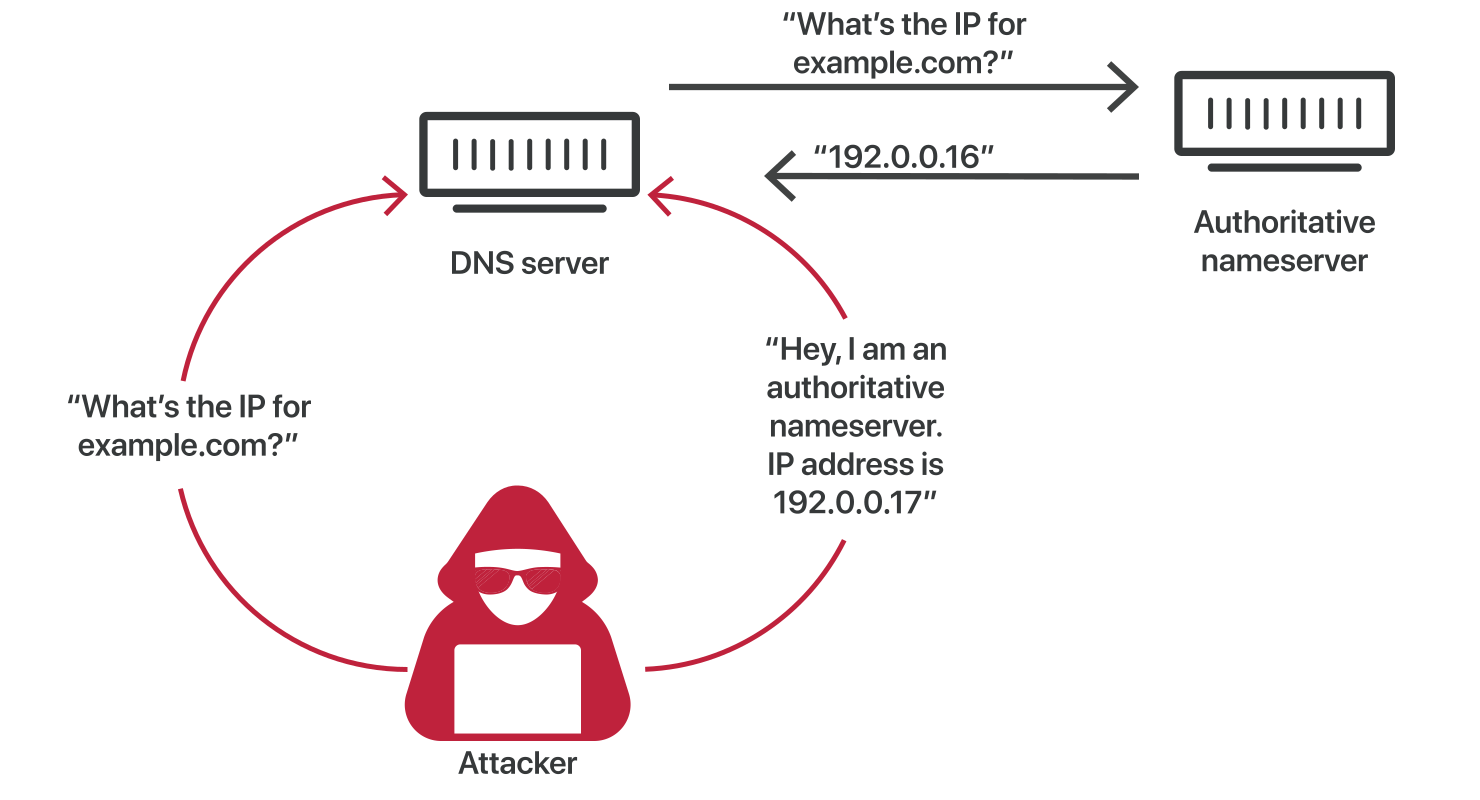
Image source: Cloudflare
Modern resolvers employ several mitigations: randomized source ports (increasing the search space from 65,536 to billions of combinations), transaction ID randomization, and bailiwick checking (rejecting responses that claim authority for domains outside the queried zone). But these are patches, not fundamental solutions.
DNSSEC: Cryptographic Authentication for DNS
DNS Security Extensions (DNSSEC) addresses the authentication problem by digitally signing DNS records. Rather than trusting that a response genuinely comes from the authoritative server, DNSSEC allows resolvers to verify signatures against a chain of trust rooted in the DNS root zone.
DNSSEC introduces new record types:
- DNSKEY contains public keys used to verify signatures
- RRSIG contains cryptographic signatures for record sets
- DS (Delegation Signer) creates the chain of trust between parent and child zones
- NSEC/NSEC3 provides authenticated denial of existence (proving a record doesn’t exist)
Each zone has two key pairs: a Zone-Signing Key (ZSK) that signs the zone’s records, and a Key-Signing Key (KSK) that signs the DNSKEY record containing the ZSK. The parent zone publishes a DS record containing a hash of the child’s KSK, creating a verifiable link up the hierarchy to the root.
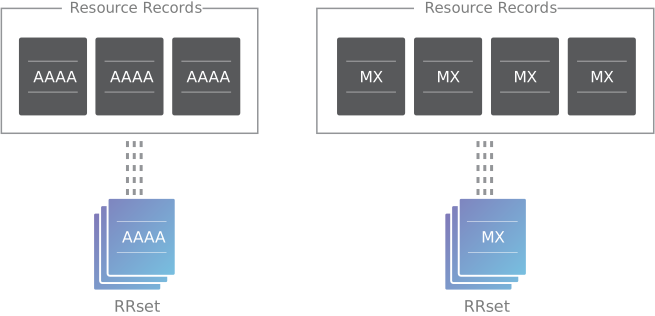
Image source: Cloudflare
The root zone’s KSK is the trust anchor for the entire system. It’s managed through an elaborate Root Signing Ceremony where trusted community representatives gather to perform cryptographic operations in a highly audited environment. This human process is necessary because there’s no parent zone to sign the root’s keys.
DNSSEC deployment remains limited. As of 2024, only about 5% of .com domains are signed, though over 90% of TLD zones themselves support DNSSEC. The complexity of key management, the additional query load from fetching DNSKEY and RRSIG records, and the risk of breaking configurations during key rollovers have slowed adoption.
Importantly, DNSSEC provides authentication, not encryption. The contents of DNS responses are still visible to anyone monitoring network traffic. For privacy, different protocols are needed.
Encrypted DNS: DoH and DoT
Traditional DNS queries travel in plaintext over UDP. Anyone with network access—ISPs, network administrators, or attackers—can see which domains you’re resolving. This enables censorship, surveillance, and behavioral profiling.
DNS over TLS (DoT) encrypts DNS queries using TLS on port 853. The dedicated port makes DoT traffic identifiable but protected from eavesdropping. Network administrators can see that DNS queries are happening and can choose to allow or block this traffic.
DNS over HTTPS (DoH) wraps DNS queries in HTTPS on port 443. From a network perspective, DoH traffic looks like normal web browsing—there’s no way to distinguish DNS queries from other HTTPS content without deep packet inspection. This makes DoH harder to block but reduces network administrators’ visibility into DNS activity.
The trade-off between control and privacy has made DoH controversial. Enterprise security teams argue that encrypted DNS bypasses their ability to filter malicious domains. Privacy advocates counter that DNS should be encrypted by default, just as HTTPS has become standard for web traffic.
Both protocols require support from both the client (browser or operating system) and the resolver. Major browsers now support DoH, and public resolvers like Cloudflare’s 1.1.1.1 and Google’s 8.8.8.8 support both DoT and DoH.
Anycast: How Root Servers Handle Billions of Queries
The DNS root zone is served by 13 logical identities (A through M), but each identity represents hundreds of physical servers distributed globally. This is achieved through Anycast routing: multiple servers announce the same IP address, and the network’s routing infrastructure directs queries to the nearest instance.
When you query a.root-servers.net (198.41.0.4), your traffic doesn’t travel to a single server in Virginia. It routes to whichever A-root instance is closest according to BGP—the protocol that governs Internet routing. A user in Tokyo reaches an A-root instance in Japan; a user in London reaches one in the UK.
Anycast provides resilience beyond what’s possible with load balancers. If an entire data center fails, BGP automatically reroutes traffic to other instances. Attack traffic gets distributed across the global network, making DDoS attacks against root infrastructure impractical to execute at scale.
As of late 2024, there are over 1,750 root server instances across 90+ countries. The F-root alone has over 260 instances. This geographic diversity means most users reach a root server in under 50ms latency, keeping the first step of DNS resolution fast regardless of location.
Reverse DNS: From IP Address Back to Domain
While forward DNS maps domain names to IP addresses, reverse DNS performs the opposite lookup—given an IP address, find the domain name. This uses PTR records in special in-addr.arpa (for IPv4) and ip6.arpa (for IPv6) zones.
For the IP address 93.184.216.34, the reverse lookup queries 34.216.184.93.in-addr.arpa. Notice the reversed octets—this aligns with the hierarchical delegation of IP address space, where the most significant octets are controlled by regional registries.
Reverse DNS is essential for email servers. Many mail systems reject messages from servers whose IP address doesn’t resolve to a domain matching the HELO/EHLO greeting. This prevents spammers from easily forging sender identities. It’s also used in logging and troubleshooting to identify the hosts behind IP addresses in network traffic.
Unlike forward DNS, reverse DNS is controlled by whoever owns the IP address block—not necessarily the domain owner. Hosting providers and ISPs manage PTR records for their IP allocations.
DNS Prefetching: Speculative Optimization
Modern browsers employ DNS prefetching to reduce perceived latency. When parsing an HTML document, browsers extract all linked domains and begin DNS resolution before the user clicks anything. By the time a user follows a link, the DNS lookup may already be complete.
The <link rel="dns-prefetch" href="//example.com"> hint explicitly tells browsers to resolve a domain preemptively. This is useful for critical third-party resources—CDNs, fonts, APIs—that will definitely be needed but aren’t discovered during initial HTML parsing.
DNS prefetching trades bandwidth for latency. The browser makes DNS queries that might never be needed, but the cost is minimal (a few hundred bytes per query) compared to the hundreds of milliseconds saved when the user does navigate.
Negative Caching: Remembering What Doesn’t Exist
When you query a non-existent domain, the resolver receives an NXDOMAIN response. Rather than immediately forgetting this result, resolvers cache the negative response for a period determined by the SOA record’s minimum field.
Negative caching prevents repeated queries for typos and non-existent subdomains. Without it, a browser retrying a failed request would trigger new DNS lookups each time. The cache acts as a damper, limiting the query load generated by errors.
The negative cache TTL is particularly important during domain transitions. If you decommission a subdomain, removing its DNS record, the negative cache determines how quickly that removal propagates. Users with cached negative responses won’t retry the lookup until the TTL expires.
EDNS: Breaking the 512-Byte Barrier
The original DNS specification limited UDP messages to 512 bytes. This was sufficient for simple queries, but modern DNS responses often exceed this limit—especially DNSSEC responses containing multiple signatures and keys.
Extension Mechanisms for DNS (EDNS0), defined in RFC 6891, allows clients to advertise their maximum UDP message size. An EDNS0-compliant client includes an OPT pseudo-record in the additional section, specifying a buffer size up to 4096 bytes.
Servers respond with larger packets if necessary, or truncate the response and set the TC flag if the response exceeds the client’s advertised limit. Truncated responses force a fallback to TCP, which has no size limitations but incurs additional latency from the TCP handshake.
EDNS0 also enables additional features like extended RCOREs (error codes), flags, and the ability to carry arbitrary data in options. The EDNS Client Subnet (ECS) option, for instance, allows resolvers to include partial client IP addresses in queries, enabling authoritative servers to return geo-targeted responses.
The Invisible Infrastructure
DNS operates as infrastructure—not something users think about, but something that fails visibly when it breaks. A misconfigured DNS record can make an entire service unreachable. A cache poisoning attack can redirect users to malicious sites. A DDoS attack on a major DNS provider can knock offline the services that depend on it.
The system’s resilience comes from its distributed nature. No single point of failure exists at the root level. Caching at every layer absorbs the vast majority of query load. And the protocol itself, despite its age, has proven adaptable to modern requirements through extensions like EDNS, DNSSEC, DoH, and DoT.
Understanding DNS reveals how much complexity hides behind the simple act of typing a URL. Within milliseconds, a query traverses continents, consults multiple servers, traverses cached entries at several layers, and returns the address your browser needs—all before you see the first pixel of the page load.
References
-
Mockapetris, P. (1987). RFC 1035: Domain Names - Implementation and Specification. IETF. https://datatracker.ietf.org/doc/html/rfc1035
-
IANA. (2024). Root Servers. https://www.iana.org/domains/root/servers
-
Arends, R., et al. (2005). RFC 4033: DNS Security Introduction and Requirements. IETF. https://datatracker.ietf.org/doc/html/rfc4033
-
Herzberg, A., & Shulman, H. (2013). Fragmentation, Truncation, and Timeouts: Are Large DNS Messages Falling to Bits? SIDN Labs. https://www.sidnlabs.nl/downloads/4nEIOFHKbAStsWQhh2l4Lr/5e69fe630bc7290713eb9638c2229828/Fragmentation__truncation__and_timeouts_are_large_DNS_messages_falling_to_bits.pdf
-
Kaminsky, D. (2008). Black Ops 2008: It’s The End Of The Cache As We Know It. Black Hat. https://blackhat.com/presentations/bh-jp-08/bh-jp-08-Kaminsky/BlackHat-Japan-08-Kaminsky-DNS08-BlackOps.pdf
-
Hoffman, P., & McManus, P. (2018). RFC 8484: DNS Queries over HTTPS (DoH). IETF. https://datatracker.ietf.org/doc/html/rfc8484
-
Hu, Z., et al. (2016). RFC 7858: Specification for DNS over Transport Layer Security (TLS). IETF. https://datatracker.ietf.org/doc/html/rfc7858
-
Gieben, R., & Mekking, W. (2014). RFC 6891: Extension Mechanisms for DNS (EDNS(0)). IETF. https://datatracker.ietf.org/doc/html/rfc6891
-
Andrews, M. (1998). RFC 2308: Negative Caching of DNS Queries (DNS NCACHE). IETF. https://datatracker.ietf.org/doc/html/rfc2308
-
Internet Society Pulse. (2025). More Than 70% of DNS Root Queries Are Junk. https://pulse.internetsociety.org/en/blog/2025/10/more-than-70-of-dns-root-queries-are-junk/
-
SIDN. (2025). None of the Biggest Internet Services Are DNSSEC-Enabled. https://www.sidn.nl/en/news-and-blogs/none-of-the-biggest-internet-services-are-dnssec-enabled
-
Cloudflare. What is DNS? https://www.cloudflare.com/learning/dns/what-is-dns/
-
Cloudflare. How Does DNSSEC Work? https://www.cloudflare.com/learning/dns/dnssec/how-dnssec-works/
-
Wikipedia. Root Name Server. https://en.wikipedia.org/wiki/Root_name_server