In September 1992, a committee called the Joint Photographic Experts Group published a standard that would fundamentally change how humanity stores and shares images. The JPEG format, based on the discrete cosine transform (DCT), made digital photography practical by reducing file sizes by a factor of 10 while maintaining acceptable visual quality. Three decades later, JPEG remains the most widely used image format in the world, with billions of images created daily.
The algorithm inside every JPEG file represents a masterclass in signal processing, exploiting fundamental properties of human vision and mathematical transforms to achieve remarkable compression. Understanding how JPEG works reveals why it succeeded where alternatives failed—and why its artifacts look the way they do.
The First Trick: Separating Luminance from Chrominance
Human vision has a peculiar asymmetry. Our eyes contain about 120 million rods that detect light intensity but only about 6 million cones that detect color. We perceive fine detail in brightness changes far better than in color changes. JPEG exploits this biological fact before any actual compression begins.
The first step converts the image from RGB (red, green, blue) to YCbCr color space. The Y component represents luminance—essentially a grayscale version of the image. Cb and Cr represent chrominance—color information relative to blue and red respectively. The conversion formula is:
$$Y = 0.299R + 0.587G + 0.114B$$$$Cb = 128 - 0.1687R - 0.3313G + 0.5B$$
$$Cr = 128 + 0.5R - 0.4187G - 0.0813B$$
Once separated, JPEG applies chroma subsampling. The most common configuration, called 4:2:0, reduces the Cb and Cr channels to one-quarter resolution. For every 2×2 block of pixels, only one color value is stored for each chroma channel, while all four luminance values are preserved. This immediately halves the data size with virtually no perceptible quality loss.

Image source: Wikipedia - JPEG
The Core Transform: Discrete Cosine Transform
After color space conversion, the image divides into 8×8 pixel blocks. Each block undergoes a two-dimensional discrete cosine transform, converting spatial pixel values into frequency coefficients. This is where the real compression potential emerges.
The DCT is closely related to the Fourier transform but uses only real cosine functions rather than complex exponentials. For an 8×8 block, the forward DCT produces 64 coefficients representing different frequency components:
$$F(u,v) = \frac{1}{4} C(u) C(v) \sum_{x=0}^{7} \sum_{y=0}^{7} f(x,y) \cos\left[\frac{(2x+1)u\pi}{16}\right] \cos\left[\frac{(2y+1)v\pi}{16}\right]$$where $C(k) = \frac{1}{\sqrt{2}}$ when $k = 0$ and $C(k) = 1$ otherwise.
The coefficient at position (0,0) is called the DC coefficient—it represents the average intensity of the entire 8×8 block. The remaining 63 coefficients are AC coefficients, representing increasingly high-frequency patterns.

Image source: Wikipedia - Discrete Cosine Transform
The critical insight is that natural images concentrate most of their energy in low-frequency coefficients. High-frequency details—fine textures, sharp edges—typically produce small coefficient values. This energy compaction property makes the DCT ideal for compression.
Why 8×8 Blocks?
The choice of 8×8 blocks was deliberate. Smaller blocks reduce the effectiveness of energy compaction. Larger blocks improve compaction but increase computational cost and can introduce visible artifacts across larger regions. Research during JPEG’s development found that 8×8 offered the best trade-off: sufficient energy compaction for natural images while keeping processing tractable on 1990s hardware.
Quantization: Where Information is Lost
The DCT itself is lossless—given the coefficients, you can perfectly reconstruct the original pixels. JPEG’s lossy compression enters at the quantization stage. Each of the 64 DCT coefficients is divided by a corresponding value from an 8×8 quantization matrix and rounded to the nearest integer:
$$Q(u,v) = \text{round}\left(\frac{F(u,v)}{\text{QuantMatrix}(u,v)}\right)$$The quantization matrix determines which frequencies are preserved and which are discarded. Larger values in the matrix cause more aggressive rounding, producing more zeros in the quantized coefficients. Since human vision is less sensitive to high-frequency details, quantization matrices typically have larger values in the bottom-right (high-frequency) region.
The standard luminance quantization matrix at quality 50:
16  11  10  16  24  40  51  61
12  12  14  19  26  58  60  55
14  13  16  24  40  57  69  56
14  17  22  29  51  87  80  62
18  22  37  56  68 109 103  77
24  35  55  64  81 104 113  92
49  64  78  87 103 121 120 101
72  92  95  98 112 100 103  99
Notice how values increase toward the bottom-right. High-frequency coefficients (representing fine details) are divided by larger numbers, producing more zeros after rounding. This is where JPEG discards information—irrecoverably.
The “quality” setting in image editors (typically 1-100) scales this matrix. Higher quality uses smaller matrix values, preserving more frequency information. Quality 100 uses all ones, meaning no quantization loss at this stage. Quality 1 scales values so aggressively that only the DC coefficient typically survives.
Zigzag Scanning: Grouping the Zeros
After quantization, many AC coefficients are zero, especially those representing high frequencies. JPEG uses a zigzag scanning pattern to convert the 2D 8×8 matrix into a 1D sequence, arranged so that low-frequency coefficients (more likely to be non-zero) appear first, followed by high-frequency coefficients (more likely to be zero).
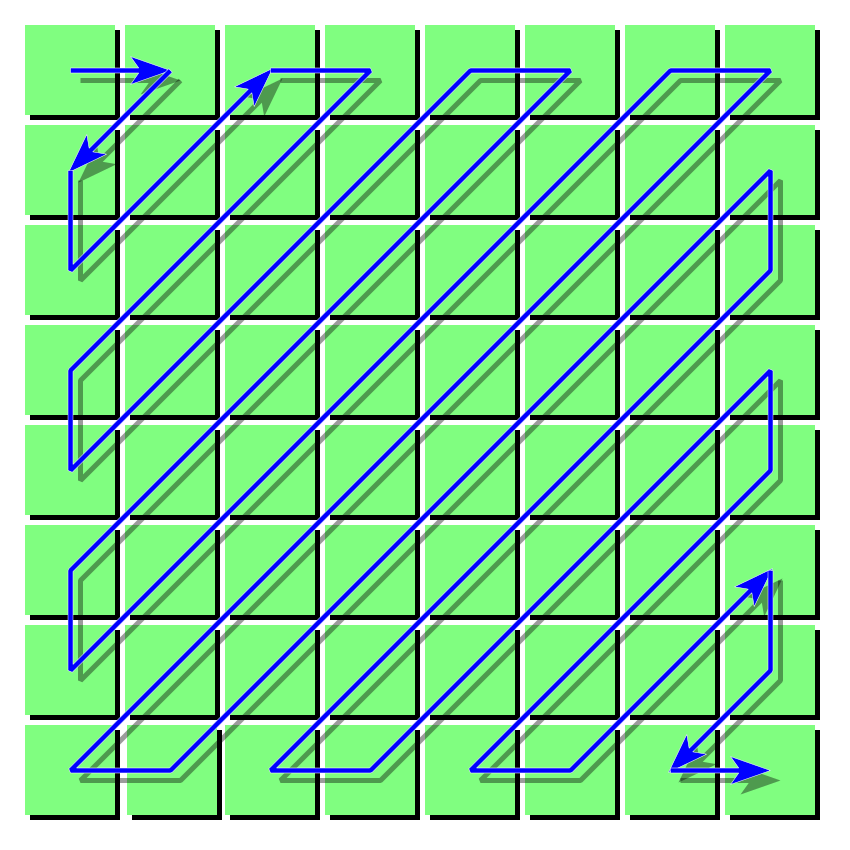
Image source: Wikipedia - JPEG ZigZag

This ordering creates long runs of consecutive zeros at the end of each block, which compresses efficiently with run-length encoding.
Entropy Coding: The Lossless Finish
The final compression stage is lossless. JPEG uses Huffman coding (or optionally arithmetic coding in less common implementations) to encode the quantized coefficients:
DC coefficients are encoded differentially. Instead of storing the absolute value, JPEG stores the difference between consecutive DC values. Since adjacent blocks in natural images have similar average brightness, these differences are typically small, producing shorter codes.
AC coefficients are encoded as (run-length, size) pairs followed by amplitude bits. The run-length indicates how many zeros precede a non-zero coefficient. A special End-of-Block (EOB) symbol indicates that all remaining coefficients are zero.
Huffman coding assigns shorter bit sequences to more common values and longer sequences to rare values. For example, the most common DC difference category (small differences near zero) might be encoded in just 2 bits, while large differences require more bits.
The Visible Consequences: Compression Artifacts
JPEG’s block-based approach and quantization produce characteristic artifacts, especially at low quality settings:
Blocking artifacts appear because each 8×8 block is processed independently. At block boundaries where adjacent blocks made different quantization decisions, visible discontinuities emerge. This creates the characteristic “blocky” appearance of heavily compressed JPEGs.
Ringing artifacts (also called “mosquito noise”) appear near sharp edges. When quantization removes high-frequency coefficients, the inverse DCT cannot reconstruct sharp transitions accurately. The result is rippling or echoing patterns around edges.
These artifacts are why JPEG performs poorly on text, line art, and computer graphics—content with sharp edges and high-frequency details that quantization destroys.
Progressive JPEG: A Different Ordering
Standard (baseline) JPEG stores blocks sequentially—top to bottom, left to right. Progressive JPEG reorganizes the data into multiple scans. The first scan contains only the most significant bits of each coefficient (coarse approximation). Subsequent scans add progressively finer detail.
Progressive JPEG doesn’t improve compression ratio or quality. Its advantage is perceived speed: users see a low-quality preview quickly, with detail filling in as more data arrives. For large images over slow connections, this dramatically improves user experience.
Why JPEG Endured
JPEG’s longevity stems from a remarkable balance of compression efficiency, computational simplicity, and visual quality. The 8×8 DCT, while not theoretically optimal, was implementable in hardware when the standard was created. The quantization approach allowed quality-versus-size trade-offs without changing the algorithm. The format remained royalty-free after patent disputes were resolved.
Alternatives like JPEG 2000 (using wavelets) offered better compression ratios but required significantly more computation. WebP and AVIF provide superior compression today but face adoption inertia against billions of existing JPEG decoders in cameras, browsers, and embedded systems.
Every time you share a photo, you’re invoking a pipeline that converts colors to exploit human visual limitations, transforms spatial data into frequency components, strategically discards information, and losslessly compresses the remainder. The mathematics developed by Ahmed, Natarajan, and Rao in 1974—refined through decades of signal processing research—now runs invisibly in every smartphone, browser, and digital camera on Earth.
References
-
Wallace, G. K. (1991). “The JPEG Still Picture Compression Standard.” Communications of the ACM, 34(4), 30-44.
-
Ahmed, N., Natarajan, T., & Rao, K. R. (1974). “Discrete Cosine Transform.” IEEE Transactions on Computers, C-23(1), 90-93.
-
ISO/IEC 10918-1:1994. “Digital Compression and Coding of Continuous-tone Still Images: Requirements and Guidelines.”
-
Watson, A. B. (1994). “Image Compression Using the Discrete Cosine Transform.” Mathematica Journal, 4(1), 81-88.
-
Wikipedia. JPEG. https://en.wikipedia.org/wiki/JPEG
-
Wikipedia. Discrete Cosine Transform. https://en.wikipedia.org/wiki/Discrete_cosine_transform
-
Pennebaker, W. B., & Mitchell, J. L. (1993). JPEG: Still Image Data Compression Standard. Van Nostrand Reinhold.
-
Gonzalez, R. C., & Woods, R. E. (2018). Digital Image Processing (4th ed.). Pearson.
-
Hudson, G. P., Léger, A., Niss, B., & Wasilewski, M. (2018). “JPEG-1 Standard 25 Years: Past, Present, and Future Reasons for a Success.” Journal of Electronic Imaging, 27(4), 040901.
-
ShortPixel. (2026). “Progressive JPEG vs Baseline JPEG: Does It Still Matter in 2026?” https://shortpixel.com/blog/progressive-jpeg-vs-baseline-jpeg-does-it-still-matter-in-2026/
-
Pomodo.io. (2023). “The Ultimate Guide to JPEG Including JPEG Compression & Encoding.” https://pomodo.io/tech-archive/jpeg-definitive-guide/
-
Compress-Or-Die. (2020). “Finally Understanding JPG.” https://compress-or-die.com/Understanding-JPG
-
NASA Ames Research Center. “Image Compression Using the Discrete Cosine Transform.” https://humansystems.arc.nasa.gov/publications/mathjournal94.pdf
-
MathWorks. “Discrete Cosine Transform.” https://www.mathworks.com/help/images/discrete-cosine-transform.html
-
The ANSI Blog. (2018). “Why JPEG 2000 Never Took Off.” https://blog.ansi.org/ansi/why-jpeg-2000-never-used-standard-iso-iec/