In 1962, the Atlas computer at the University of Manchester faced an impossible problem. Programs were growing larger than available memory, and programmers spent countless hours manually shuffling data between main memory and drum storage. The solution they invented—virtual memory—would become one of the most consequential abstractions in computing history. Today, every program you run believes it has access to a massive, contiguous block of memory starting at address zero. None of this is real.
The Illusion of Infinite Memory
When you launch a web browser, it sees a pristine address space where it can allocate memory from address 0x0000000000400000 onwards. When you open a terminal, it sees the exact same addresses. When your database server spins up, it too believes memory begins at zero. How can thousands of processes simultaneously access identical memory addresses without colliding?
The answer lies in a fundamental transformation that happens between the addresses your program uses and the actual physical RAM chips. Every memory access—every variable read, every function call, every array index—passes through a hidden translation layer that maps your program’s “virtual” addresses to real physical locations.
This translation happens in hardware, billions of times per second, completely invisible to your code. The component responsible is the Memory Management Unit (MMU), and it transforms how operating systems manage memory.

Image source: Wikipedia
Pages: Breaking Memory into Manageable Chunks
Virtual memory systems don’t track individual bytes—that would require more metadata than actual data. Instead, they divide both virtual and physical memory into fixed-size blocks called pages (virtual) and frames (physical). On most modern systems, the standard page size is 4 kilobytes.
When your program accesses address 0x7ffe1c9c9000, the MMU splits this into two parts:
- The page number (upper bits): identifies which virtual page contains the address
- The offset (lower 12 bits for 4KB pages): the position within that page
The translation problem then becomes: given a virtual page number, find its corresponding physical frame number. Add the same offset, and you have your physical address.
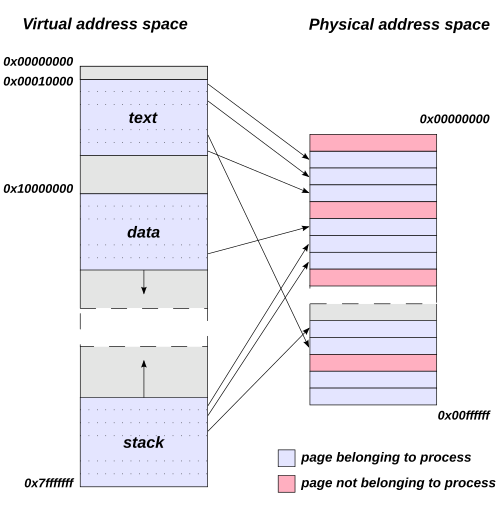
Image source: Wikipedia
Page Tables: The Map of Memory
The data structure that stores virtual-to-physical mappings is called a page table. Conceptually, it’s a simple lookup table: index by virtual page number, get physical frame number. But the reality is more complex.
Consider a 64-bit system with 48-bit virtual addresses (the current x86-64 implementation). With 4KB pages, that’s $2^{36}$ possible virtual pages—over 68 billion entries. Even at 8 bytes per entry, a flat page table would consume 512 GB per process, an absurd overhead.
The solution is multi-level page tables. Instead of one massive table, the page table becomes a tree structure. On x86-64, this is a 4-level hierarchy:
- Page Global Directory (PGD): The root, pointed to by the CR3 register
- Page Upper Directory (PUD): Second level
- Page Middle Directory (PMD): Third level
- Page Table (PT): Fourth level, contains actual frame mappings
Each level uses 9 bits of the virtual address as an index. This means each table is exactly one page (512 entries × 8 bytes = 4KB), making memory allocation efficient.
The brilliance of this design is that sparse address spaces only need sparse page tables. If your program only uses memory at low addresses (heap, stack) and high addresses (shared libraries), the middle regions don’t need page tables at all. The parent directory entries can simply be marked “not present.”
graph TD
    A[Virtual Address 48 bits] --> B[PGD Index 9 bits]
    A --> C[PUD Index 9 bits]
    A --> D[PMD Index 9 bits]
    A --> E[PT Index 9 bits]
    A --> F[Offset 12 bits]

    B --> G[PGD Table]
    G --> H[PUD Table]
    C --> H
    H --> I[PMD Table]
    D --> I
    I --> J[Page Table]
    E --> J
    J --> K[Physical Frame]
    F --> K
    K --> L[Physical Address]
The Cost of Translation and the TLB
Every memory access now requires walking through four levels of page tables—a minimum of four additional memory reads before you get your actual data. This would make computers impossibly slow.
Enter the Translation Lookaside Buffer (TLB): a small, ultra-fast cache inside the CPU that stores recently used virtual-to-physical translations. It’s a content-addressable memory (CAM) that can search all entries simultaneously in a single clock cycle.
When your program accesses memory:
- The TLB is checked first
- TLB hit (typically 99%+ of the time): Translation happens instantly, 0.5-1 clock cycles
- TLB miss: Hardware performs a page table walk, 10-100+ clock cycles

Image source: Wikipedia
The numbers tell the story. A typical TLB has 64-512 entries but covers hundreds of megabytes of actively accessed memory (since each entry maps an entire page). Miss rates are typically 0.01-1% for normal workloads, though graph algorithms and sparse data structures can push this to 20-40%.
Page Faults: When Memory Isn’t There
What happens when the page table walk finds no valid mapping? A page fault exception occurs. This isn’t necessarily an error—it’s the mechanism that enables modern memory management.
The operating system’s page fault handler determines the cause:
Invalid access: The program tried to access memory it never allocated. Result: segmentation fault, program termination.
Valid but not in RAM: The page exists (it’s part of the program’s address space) but has been swapped to disk or never loaded. This is where virtual memory truly shines—the OS can keep more programs running than physical memory can hold.
When a page needs to be brought in from disk:
- Find a free frame (or evict one using a page replacement algorithm)
- Read the page from disk into the frame
- Update the page table
- Invalidate the TLB entry (if any)
- Restart the faulting instruction
This entire process is demand paging: loading pages only when accessed, not in advance. Combined with zero-fill-on-demand, new allocations don’t even touch disk—they simply map to a special zero-filled frame that gets copied on first write.
Page Replacement: The Eviction Game
When physical memory fills up and a page fault occurs, the OS must choose a victim page to evict. This decision profoundly impacts performance.
The theoretically optimal algorithm (Belady’s optimal) evicts the page that won’t be needed for the longest time in the future. Unfortunately, we can’t see the future.
Least Recently Used (LRU) approximates optimal by evicting pages that haven’t been accessed recently. But tracking exact access order for every page is expensive.
The Clock algorithm provides a practical approximation. Think of it as a circular buffer with a “clock hand” that sweeps through pages:
- Each page has a “referenced” bit set by hardware when accessed
- When eviction is needed, the hand sweeps through pages
- If a page’s bit is set, clear it and move on (give it a “second chance”)
- If a page’s bit is clear, evict it
This approximates LRU with minimal overhead—one bit per page and a simple scan.
Copy-on-Write: When Identical Isn’t the Same
When a process calls fork() to create a child process, it shouldn’t need to copy its entire memory space—most of it will never change. Copy-on-Write (COW) makes fork essentially instantaneous.
Both parent and child initially share the same physical frames, with all pages marked read-only. When either process attempts to write:
- A page fault occurs (write to read-only page)
- The OS checks: is this a COW page?
- If yes, allocate a new frame, copy the data, update mappings
- Allow the write to proceed
This is why creating a child process takes microseconds, not seconds. The actual copying is deferred until absolutely necessary—and often never happens at all.
Protection: Guarding the Boundaries
Page table entries contain more than just frame numbers. They carry critical protection bits:
- Present bit: Is this page actually in physical memory?
- Read/Write bit: Can this page be modified?
- User/Supervisor bit: Can user-mode code access this?
- Execute disable (NX) bit: Can this page be executed as code?
- Dirty bit: Has this page been modified? (Necessary for knowing whether to write back to disk)
- Accessed bit: Has this page been read recently? (Used by page replacement algorithms)
These bits form the foundation of memory security. They prevent user programs from reading kernel memory, writing to code sections, or executing data. When violated, the hardware triggers a protection fault—your program crashes instead of corrupting the system.
Thrashing: When Virtual Memory Goes Wrong
Virtual memory enables running more programs than physical memory can hold. But there’s a limit. When the combined working sets of all active processes exceed physical memory, thrashing occurs.
The working set of a process is the collection of pages it actively uses within a time window. If every process’s working set fits in memory, page faults are occasional. But when working sets overflow physical memory, the system enters a death spiral:
- Process A faults, evicts a page from process B’s working set
- Process B runs, faults on the evicted page, evicts from process C
- Process C runs, faults, evicts from process A
- The CPU spends more time moving pages than executing code
Peter Denning’s working set model, proposed in 1968, addresses this by ensuring the sum of all working sets fits in memory. When this isn’t possible, the OS must suspend processes until their working sets can be accommodated.
Modern systems handle this automatically, but the symptoms are familiar: a system that’s technically “working” but completely unresponsive, with disk activity at maximum and CPU utilization near zero.
Huge Pages: Scaling the TLB
As memory sizes grow, the 4KB page becomes a bottleneck. A 1 GB working set requires 262,144 TLB entries to cover—far more than most TLBs provide.
Huge pages (2 MB or 1 GB on x86-64) reduce TLB pressure dramatically. A single TLB entry can now cover megabytes instead of kilobytes. For databases, in-memory caches, and scientific computing, this can mean 10-50% performance improvements.
But huge pages have tradeoffs:
- Memory waste if allocations don’t align to page boundaries
- Increased allocation latency (contiguous physical memory is harder to find)
- Complexity in managing mixed page sizes
Most systems use huge pages for specific workloads (databases, virtual machines) while keeping standard pages for general applications.
The Security Frontier: KPTI and Meltdown
In 2018, the Meltdown vulnerability revealed that virtual memory’s security guarantees had a hardware flaw. Spectre-like attacks could read kernel memory from user space, bypassing page table protections.
The mitigation—Kernel Page Table Isolation (KPTI)—separated user and kernel page tables entirely. Previously, kernel mappings were present (but inaccessible) in every process’s page table for efficiency. Now, switching to kernel mode requires switching to a separate kernel page table.
This doubles the number of TLB flushes on system calls, costing 5-30% performance on syscall-heavy workloads. Newer CPUs with PCID (Process-Context Identifiers) mitigate this by allowing TLB entries to be tagged with address space IDs, avoiding complete flushes.
Address Space Layout Randomization
Virtual memory also enables ASLR—randomizing where programs load in memory. Without ASLR, attackers know exactly where code and data reside. With ASLR, each execution places libraries, stack, and heap at random addresses.
The randomization happens at process creation:
- Stack starts at a random address
- Heap base is randomized
- Shared libraries load at random offsets
- Executable segments can be shifted
An attacker exploiting a buffer overflow now needs to guess addresses—a wrong guess crashes the program rather than achieving code execution. Combined with NX bits (preventing stack execution), this makes exploitation significantly harder.
Memory-Mapped Files: When Files Become Memory
The same virtual memory mechanism that maps pages to RAM can map them to files. A memory-mapped file appears in a process’s address space as an array of bytes—reading position i in the mapping reads byte i from the file.
The OS handles everything:
- Pages are loaded on demand (first access triggers a page fault)
- Modified pages are written back automatically
- Multiple processes can share the same mapping
- The page cache serves both file I/O and memory mapping
This eliminates the read()/write() syscall overhead and data copying between kernel and user space. It’s how databases, memory allocators, and large file processors achieve maximum I/O performance.
What Every Programmer Should Know
Virtual memory is transparent, but understanding it helps write better code:
Spatial locality matters. TLB entries cover entire pages. Accessing data scattered across memory causes TLB thrashing. Organizing data structures so related data shares pages improves cache and TLB performance.
Allocation isn’t free, but it’s cheaper than you think. Modern allocators request memory from the OS in large chunks. The actual cost is amortized across many allocations. Virtual memory overcommit means the OS promises more memory than it has, relying on the fact that most allocations are never fully used.
Shared memory is virtual memory’s gift. Multiple processes can map the same physical frames. This is how shared libraries work— libc lives in physical memory once, mapped into every process’s address space. It’s also how inter-process communication can be essentially instantaneous.
The working set is what matters. Your program’s memory usage isn’t about total allocation—it’s about how much it actively touches. A program that allocates 10 GB but only accesses 100 MB regularly will run fine on a system with 500 MB of RAM.
The Abstraction That Changed Everything
Virtual memory solved an immediate problem in 1962, but its impact extends far beyond memory extension. It enabled:
- Process isolation (each program in its own address space)
- Memory protection (hardware-enforced access control)
- Memory overcommit (allocating more than physically exists)
- Demand paging (loading only what’s needed)
- Shared memory (efficient inter-process communication)
- Memory-mapped I/O (files as memory)
Every program you run believes it has a private, contiguous, zero-based address space. None of this is true. The addresses your program sees don’t exist in hardware. The “memory” it accesses might be in RAM, on disk, or not yet allocated at all.
But this lie is precisely what makes modern computing possible. Programs don’t need to know about physical memory layout, fragmentation, or other processes. They simply ask for memory, and the operating system—through virtual memory—provides the illusion.
The Atlas computer’s invention has outlasted the machine itself by six decades. Every smartphone, laptop, and server still relies on the same fundamental abstraction: virtual addresses translated to physical ones, on every memory access, billions of times per second. The invisible layer that makes every program think it has the entire RAM is perhaps the most successful lie in computing history.