In 2018, a second-hand study from a university in the United Kingdom made headlines after researchers purchased 200 used hard drives from eBay and other online marketplaces. Out of 200 drives, they found that 59% still contained recoverable data—including personal photographs, financial records, and in one case, a complete database of a company’s payroll system. The previous owners had formatted these drives. Some had even run “secure erase” tools. Yet the data remained.
The gap between what people think happens when they delete a file and what actually happens is enormous. That gap is where data breaches, identity theft, and forensic investigations live. Understanding it requires diving into filesystem internals, flash memory architecture, and the physics of magnetic storage.
The First Lie: Delete Means Erase
When you delete a file on a computer, nothing gets erased. Not a single bit changes on your storage device. The file’s data remains exactly where it was—every photo, every document, every database record sits untouched in the same physical locations it occupied before you pressed delete.
What actually happens is far less dramatic: the filesystem simply removes the file’s entry from its index. Think of it like a library removing a card from its card catalog while leaving the book on the shelf. The book is still there, still readable, but no one looking at the catalog knows it exists.
This design choice made perfect sense in the early days of computing. Erasing data takes time—writing zeros or random patterns across millions of sectors is slow. Removing a reference is nearly instantaneous. When disk space was expensive and computers were slow, this optimization mattered. It still matters today, which is why every mainstream operating system works this way.
How NTFS Handles Deletion
On Windows systems using NTFS, every file has an entry in the Master File Table (MFT)—a special database that tracks all files on the volume. Each MFT record contains the file’s metadata: name, timestamps, permissions, and most importantly, the addresses of the clusters where the file’s data lives.
When you delete a file, NTFS performs several operations:
- Marks the MFT entry as unused by setting a flag in the entry’s header
- Updates the $Bitmap file, which tracks which clusters are free
- Removes the directory entry that linked the filename to its MFT record
The actual data clusters remain untouched. If you examine the raw disk immediately after deletion, every byte of the file is still there, in the same locations, readable by anyone who knows where to look.
The MFT entry itself isn’t even truly deleted—it’s marked as available for reuse. Until the filesystem needs that entry slot for a new file, the old metadata remains, including the cluster addresses. This is why forensic tools can often recover deleted files with their original filenames intact: the MFT entry still exists, just flagged as “unused.”
ext4’s More Aggressive Approach
Linux’s ext4 filesystem takes a slightly different approach, one that makes recovery harder but still possible. When a file is deleted, ext4:
- Removes the directory entry (similar to NTFS)
- Updates the inode bitmap to mark the inode as free
- Zeroes certain inode fields, including the deletion time (
i_dtime) and link count - Partially clears block pointers in the inode
That last step is significant. Unlike NTFS, which preserves the cluster addresses in the MFT entry, ext4 zeroes out the direct and indirect block pointers in the inode. This means you can’t simply read the inode to find where the data lived.
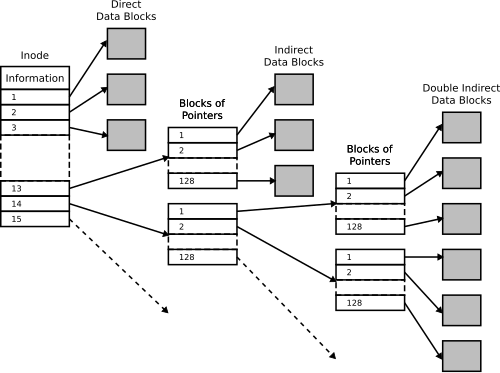
Image source: Wikipedia - Inode pointer structure
However, the actual data blocks still aren’t erased. The journal—a log of filesystem changes—might contain traces of the block addresses. More importantly, forensic tools can scan the raw disk looking for file signatures, a technique called file carving that recovers files without any metadata at all.
FAT’s Simple but Vulnerable Design
The FAT filesystem family (FAT12, FAT16, FAT32, exFAT), still used on USB drives and SD cards, uses the simplest deletion mechanism of all. Each directory entry is 32 bytes, and the first byte of the filename serves as a status marker.
When a file is deleted, FAT simply overwrites that first byte with 0xE5. That’s it. The rest of the directory entry—filename characters 2-11, file size, starting cluster number, timestamps—remains completely intact. The FAT table itself is updated to mark the file’s clusters as available (replacing the cluster chain with zeros), but again, the actual data remains untouched.
sequenceDiagram
    participant User
    participant OS as Operating System
    participant FS as File System
    participant Disk as Storage Device

    User->>OS: Delete file "secret.doc"
    OS->>FS: Request file deletion
    FS->>FS: Mark directory entry (0xE5)
    FS->>FS: Clear FAT chain entries
    FS->>Disk: No write operation
    Note over Disk: Data remains intact
    OS->>User: File deleted
This simplicity is why FAT is so easy to recover from. The directory entry often preserves the original filename (minus the first character), the file size, and the starting cluster. Forensic software can reconstruct the file with high accuracy.
File Carving: Finding Files Without a Map
When metadata is corrupted or unavailable, data recovery falls back on file carving—scanning raw storage for file signatures. Most file formats begin with distinctive byte sequences:
| File Type | Header Signature | Footer Signature |
|---|---|---|
| JPEG | FF D8 FF |
FF D9 |
| PNG | 89 50 4E 47 0D 0A 1A 0A |
49 45 4E 44 AE 42 60 82 |
25 50 44 46 |
25 25 45 4F 46 |
|
| ZIP | 50 4B 03 04 |
50 4B 05 06 |
| DOCX | 50 4B 03 04 (ZIP-based) |
50 4B 05 06 |
A file carving tool scans the disk byte by byte, looking for these signatures. When it finds a header, it extracts everything until it finds the corresponding footer (or until it reaches the file’s maximum possible size).
This technique has limitations. Fragmented files—where pieces of a file are scattered across non-contiguous sectors—may not recover correctly. Files without clear signatures (like plain text files) are harder to identify. But for common file types, file carving remains remarkably effective.
The fundamental truth is this: until data is overwritten, it exists. The filesystem’s bookkeeping might forget about it, but the physical storage hasn’t changed.
The SSD Revolution: Everything Changed
Solid-state drives fundamentally altered the data recovery landscape. SSDs don’t store data on magnetic platters—they use NAND flash memory, which has entirely different physics and constraints.
NAND Flash’s Fundamental Limitation
NAND flash memory can’t overwrite existing data directly. Each memory cell must be erased before it can be written again. But erasing is a destructive operation that wears out the cell—NAND flash has a limited number of erase cycles (typically 1,000 to 100,000 depending on the type).
To work around this, SSDs use a translation layer called the Flash Translation Layer (FTL). When the operating system writes to a logical block address (LBA), the SSD controller maps that LBA to a physical location in NAND flash. If the LBA was previously written, the controller writes to a new physical location and updates its mapping table—the old location is simply marked as invalid.
This architecture creates several phenomena unique to SSDs:
Wear Leveling: Data Persists in Unexpected Places
To maximize the lifespan of an SSD, the controller employs wear leveling—algorithms that distribute writes and erases across all physical blocks evenly. This means that even if you overwrite a file, the new data might go to a completely different physical location than the old data.
The old data remains in its original location until that block is erased for reuse. On a lightly-used drive, deleted data could persist indefinitely in these “orphaned” locations.
TRIM: The Double-Edged Sword
The TRIM command was introduced to solve a performance problem. Without TRIM, an SSD doesn’t know which LBAs contain valid data and which contain deleted data that’s no longer needed. When the SSD needs to write to a previously-used LBA, it must first read the old data, erase the block, then write the new data—a slow process called read-modify-write.
TRIM allows the operating system to tell the SSD which LBAs are no longer needed. When you delete a file, the OS sends a TRIM command listing the LBAs that file occupied. The SSD can then proactively erase those blocks during idle time, making future writes faster.
This has profound implications for data recovery. Unlike HDDs, where deleted data persists until overwritten, SSDs can actively destroy deleted data. The timing varies:
- Immediately: Some SSDs erase TRIMmed blocks instantly
- During garbage collection: Others erase during background maintenance
- Eventually: Some may hold data until the space is needed
DRAT and DZAT: Predictable Responses
Not all SSDs handle TRIMmed blocks the same way. The SATA specification defines three behaviors:
Non-deterministic (undefined): Reading a TRIMmed LBA might return old data, zeros, or garbage. Multiple reads might return different results.
DRAT (Deterministic Read After Trim): Reading a TRIMmed LBA returns a consistent value, but not necessarily zeros. The data is gone, replaced by a deterministic pattern.
DZAT (Deterministic Read Zero After Trim): Reading a TRIMmed LBA always returns zeros. This is required for enterprise SSDs used in RAID arrays with parity.
The practical reality for forensic investigators: on modern NVMe SSDs with aggressive TRIM implementation, deleted data might be gone in seconds. On older SATA SSDs with TRIM disabled, the SSD behaves more like an HDD—data persists until the wear leveling algorithm eventually cycles those blocks.
Secure Deletion: What Actually Works
The knowledge that deletion doesn’t erase data has spawned an entire industry of “secure deletion” tools and standards. But the effectiveness of these methods depends entirely on your storage medium.
Hard Disk Drives: One Pass Is Enough
For decades, the Gutmann method—35 passes with specific patterns—was considered the gold standard for secure deletion. Peter Gutmann’s 1996 paper “Secure Deletion of Data from Magnetic and Solid-State Memory” described how data could potentially be recovered from magnetic media using specialized equipment like magnetic force microscopy (MFM).
The catch: Gutmann’s research addressed 1990s-era hard drives using MFM and RLL encoding. Modern drives use PRML (Partial Response Maximum Likelihood) encoding and have far higher data densities. The 35-pass method is optimized for encoding schemes that haven’t been used in mainstream drives for decades.
In 2006, Gutmann himself updated his guidance:
“For any modern PRML/EPRML drive, a few passes of random scrubbing is the best you can do. As the paper says, ‘A good scrubbing with random data will do about as well as can be expected.’”
Modern research supports this. A 2009 study by Craig Wright and colleagues tested data recovery from modern drives using advanced techniques and found that a single pass of zeros made recovery effectively impossible. NIST Special Publication 800-88 Rev. 1 explicitly states:
“For storage devices containing magnetic media (hard disk drives), a single overwrite pass with a fixed data value, such as all zeros, hinders the recovery of data even if state-of-the-art laboratory techniques are applied to attempt to retrieve the data.”
The physics support this. When a hard drive writes a zero, it applies a magnetic field sufficient to orient magnetic domains in the desired direction. The resulting magnetization is uniform enough that even with MFM, there’s insufficient signal variation to distinguish what was there before.
SSDs: Standard Overwrite Doesn’t Work
The same cannot be said for SSDs. Because of wear leveling, when you write to a logical address, you’re not necessarily writing to the same physical location. A “secure erase” tool that writes zeros to every LBA might leave data untouched in dozens of physical locations.
This isn’t theoretical. A 2011 study by Michael Wei and colleagues at UC San Diego found that:
- None of the file shredding programs they tested reliably erased all data on SSDs
- Between 4% and 71% of file contents remained recoverable
- The only reliable method was the drive’s built-in ATA Secure Erase command
ATA Secure Erase is a firmware-level command that instructs the SSD controller to erase all user-accessible areas. Because it operates at the firmware level, it bypasses the FTL and directly erases all NAND blocks. The NVMe equivalent is called “Sanitize.”
However, even firmware-level erasure has caveats:
- Overprovisioned space: SSDs reserve extra capacity for wear leveling. Data in these areas may not be erased.
- Factory access modes: Some research suggests data can be recovered from SSDs using factory diagnostic modes that access raw NAND.
- Implementation bugs: Not all SSD firmware implements secure erase correctly.
Self-Encrypting Drives: Crypto-Erase
The most reliable method for modern SSDs is cryptographic erasure. Self-encrypting drives (SEDs) encrypt all data with a media encryption key (MEK) stored in the controller. Crypto-erase simply destroys this key—rendering all encrypted data permanently unreadable in milliseconds.
This is now the recommended approach in NIST SP 800-88 Rev. 2 for SSDs. The standard recognizes that overwriting is impractical for flash-based storage and that cryptographic erasure provides equivalent security.
The Hierarchy of Deletion Security
Not all data requires the same level of sanitization. NIST SP 800-88 defines three levels based on the sensitivity of the data:
Clear: Suitable for data that, if disclosed, would cause minimal harm. For HDDs, this means overwriting with a single pass. For SSDs, use the built-in sanitize command or cryptographic erasure.
Purge: For data that could cause serious harm if disclosed. For HDDs, this means degaussing (using strong magnetic fields) or physical destruction. For SSDs, cryptographic erasure is considered equivalent.
Destroy: For data that could cause severe or catastrophic harm. Physical destruction—shredding, incineration, or pulverization—ensures the media cannot be reconstructed.
The table below summarizes recommended approaches:
| Media Type | Clear | Purge | Destroy |
|---|---|---|---|
| HDD (magnetic) | 1-pass overwrite | Degauss + physical destruction | Shred/incinerate |
| SSD (flash) | Sanitize command or crypto-erase | Crypto-erase | Shred/incinerate |
| NVMe SSD | Sanitize (crypto/block) | Crypto-erase | Shred/incinerate |
Practical Implications
Understanding how deletion actually works changes your behavior:
For personal privacy: If you’re selling or donating a computer, a simple format isn’t enough. For HDDs, use a tool that performs a single-pass overwrite. For SSDs, use the manufacturer’s secure erase tool or the Windows “Reset this PC” feature with “Clean the drive” selected (which performs a secure erase on SSDs).
For organizations: Implement media sanitization policies aligned with NIST SP 800-88. Train staff that “delete” doesn’t mean “gone.” Consider using encryption everywhere—if data is encrypted, destroying the key is equivalent to destroying the data.
For forensic investigators: The rise of SSDs has fundamentally changed data recovery. Time is critical—TRIM can destroy evidence in seconds. On modern NVMe drives, traditional file carving may be impossible. Focus on live memory acquisition, cloud backups, and non-volatile sources.
The Final Truth
Files don’t “go” anywhere when you delete them. They stay exactly where they were, orphaned and invisible to the filesystem, until the storage medium is reused. On HDDs, this could be weeks or months—data might persist indefinitely on a drive with free space. On SSDs with TRIM, the window might be seconds.
The concept of “deletion” is largely an illusion, a user interface convenience that hides a complex reality of filesystem data structures, wear leveling algorithms, and garbage collection processes. Understanding this reality is essential for anyone handling sensitive data—or anyone hoping to recover data they didn’t mean to lose.
The next time you empty your recycle bin, remember: you haven’t erased anything. You’ve just removed the card from the catalog. The book is still on the shelf.
References
- Gutmann, P. (1996). Secure Deletion of Data from Magnetic and Solid-State Memory. USENIX Security Symposium.
- Kissel, R., Scholl, M., Skolochenko, S., & Li, X. (2014). NIST Special Publication 800-88 Rev. 1: Guidelines for Media Sanitization.
- Wei, M., Grupp, L. M., Spada, F. M., & Swanson, S. (2011). Reliably Erasing Data from Flash-Based Solid State Drives. USENIX FAST.
- Wright, C., Kleiman, D., & Sundhar, R. S. (2008). Overwriting Hard Drive Data: The Great Wiping Controversy. ICISS.
- Afonin, O. (2025). What TRIM, DRAT, and DZAT Really Mean for SSD Forensics. Elcomsoft Blog.
- Carrier, B. (2005). File System Forensic Analysis. Addison-Wesley Professional.
- Kessler, G. (2025). GCK’s File Signatures Table. Gary Kessler Associates.
- Wikipedia. (2025). Design of the FAT file system.
- Microsoft Learn. (2023). NTFS Technical Reference.
- The Linux Kernel Documentation. (2024). ext4 File System.
- NIST. (2025). NIST SP 800-88 Rev. 2: Guidelines for Media Sanitization.