At midnight UTC on January 1, 2017, deep inside Cloudflare’s custom RRDNS software, a number went negative when it should have always been at least zero. This single value caused DNS resolutions to fail across Cloudflare’s global network. The culprit? A leap second—one extra tick of the clock that most people never noticed.
The bug revealed a fundamental truth that every programmer eventually learns the hard way: time is not what you think it is. It doesn’t flow uniformly forward. It jumps, skips, and occasionally rewinds. And if your code assumes otherwise, it will break in ways that are nearly impossible to predict.
The Fundamental Fiction of Time
Computers store time as the number of seconds since January 1, 1970, 00:00:00 UTC—the Unix epoch. This seems simple enough: a monotonically increasing counter that always moves forward. But this simplicity is an illusion.
The problem is that Earth’s rotation isn’t perfectly consistent. The planet slows down and speeds up due to tidal friction, atmospheric circulation, and even the redistribution of mass from melting glaciers. The average solar day is actually about 86,400.002 seconds, not exactly 86,400. Over decades, this discrepancy accumulates.
To keep atomic time (TAI) synchronized with solar time (UT1), the International Earth Rotation and Reference Systems Service occasionally inserts leap seconds. Since 1972, 27 leap seconds have been added—always on June 30 or December 31. When a leap second occurs, the sequence goes: 23:59:58, 23:59:59, 23:59:60, 00:00:00.
Yes, “23:59:60” is a valid time. And this is where the problems begin.
When Time Goes Backward
The Cloudflare incident perfectly illustrates what happens when programmers assume time only moves forward. The RRDNS code measured how long DNS resolvers took to respond:
rtt := time.Now().Sub(start)
Under normal circumstances, rtt would be a positive number—milliseconds, typically. But during the leap second, time.Now() could return a value earlier than start. The result: a negative round-trip time.
This negative value propagated through Cloudflare’s weighted server selection algorithm. When fed to rand.Int63n(), which requires a positive argument, it triggered a panic. The Go runtime caught the panic, but the DNS query failed.
At peak, approximately 0.2% of DNS queries to Cloudflare were affected. The fix took 90 minutes to deploy to the most affected machines, with full rollout by 06:45 UTC. The root cause? A falsehood programmers believe: “time cannot go backwards.”
The IANA Time Zone Database: A Map in Constant Flux
Leap seconds are just one layer of temporal complexity. Time zones add another dimension entirely.
The IANA Time Zone Database (also known as tzdata, zoneinfo, or the Olson database) is the authoritative source for time zone rules worldwide. Paul Eggert has maintained it since 2005, with organizational backing from ICANN since 2011. The database records every civil time change since 1970—the Unix epoch—across approximately 600 named locations.
Time zone rules change constantly. Countries alter their DST schedules, abolish daylight saving entirely, or shift their UTC offset for political reasons. In 2016 alone, Azerbaijan abolished DST, Chile changed its DST dates multiple times, and Venezuela shifted its time zone by 30 minutes to save electricity.
The database releases updates several times per year. Every operating system, programming language runtime, and database system must incorporate these updates. If your server runs outdated tzdata, it will display the wrong time for recently changed regions.
The 2011 Lawsuit That Threatened Global Timekeeping
In September 2011, an astrology software company called Astrolabe sued the database maintainers, claiming copyright infringement. Astrolabe alleged that historical time zone data in the database had been derived from their proprietary atlas.
The lawsuit forced the FTP servers and mailing list offline. For several months, the global standard for time zone data was in legal limbo. ICANN stepped in on October 14, 2011, to host the database. The Electronic Frontier Foundation defended the maintainers, and Astrolabe voluntarily dismissed the suit in February 2012.
The episode highlighted how fragile global timekeeping infrastructure actually is. The database that keeps clocks synchronized worldwide depends on a handful of volunteers and has no legal protection against specious copyright claims.
Daylight Saving Time: The Twice-Yearly Nightmare
Daylight Saving Time (DST) creates two distinct edge cases that break naive datetime code: the missing hour and the ambiguous hour.
Spring Forward: The Missing Hour
When DST begins, clocks jump forward by one hour. In the United States, this happens at 2:00 AM local time, which becomes 3:00 AM. The hour from 2:00 AM to 3:00 AM simply doesn’t exist.
Consider what happens when a scheduled task runs at 2:30 AM. On the spring-forward day, that time never occurs. Does the task run at 1:30 AM? 3:30 AM? Not at all? The answer depends entirely on implementation details, and different systems handle it differently.
timeline
    title DST Spring Forward: The Missing Hour
    section Standard Time
        1:00 AM : Valid time
        1:30 AM : Valid time
        1:59 AM : Last moment before transition
    section Transition
        2:00 AM : Does not exist - becomes 3:00 AM
        2:30 AM : Does not exist
    section Daylight Time
        3:00 AM : Valid time (was 2:00 AM)
        3:30 AM : Valid time
Fall Back: The Ambiguous Hour
When DST ends, clocks fall back by one hour. The hour from 1:00 AM to 2:00 AM occurs twice. When you see “1:30 AM” on that day, which occurrence do you mean? The first one, in daylight time, or the second one, in standard time?
This ambiguity has real consequences. A cron job scheduled for 1:30 AM might execute twice. A log entry at “1:45 AM” is inherently ambiguous without timezone offset information. Database queries that group by hour will show double counts for the repeated hour.
The Mathematics of Time Zone Boundaries
Time zone boundaries don’t follow neat lines of longitude. They’re shaped by politics, economics, and historical accidents. China spans five natural time zones but uses a single time (UTC+8) for national unity—a decision made by Mao Zedong in 1949. This means that in western China, the sun rises at 10 AM in winter.
Nepal uses UTC+5:45, offset by 45 minutes from its neighbors. The Chatham Islands, part of New Zealand, use UTC+12:45. These fractional offsets exist because countries chose times that aligned with their solar noon, even if it meant deviating from their neighbors.
Time zone identifiers in the IANA database follow a convention: Area/Location, such as America/New_York or Asia/Kolkata. Locations are typically the most populous city in a region, chosen because city names are more stable than country names. The database includes historical data for each location, tracking every time zone change since 1970.
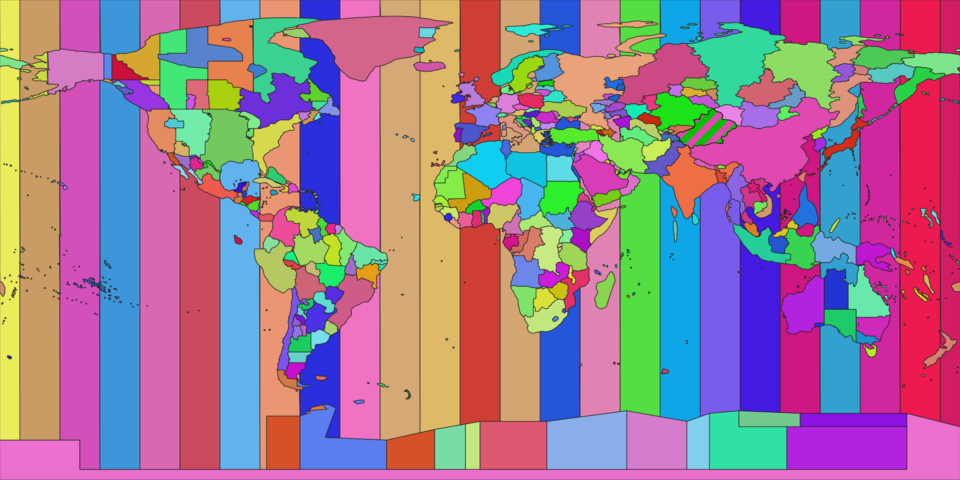
Image source: Wikimedia Commons - Timezone Boundary Builder

The Year 2038 Problem: A Ticking Clock
Unix time is stored as a 32-bit signed integer counting seconds since the epoch. On January 19, 2038, at 03:14:07 UTC, this counter will reach its maximum value: 2,147,483,647. The next second will overflow, wrapping to a negative number.
For systems using 32-bit time_t, this overflow will cause dates to appear as December 13, 1901—a 136-year jump backward. Embedded systems, legacy databases, and file formats that store timestamps as 32-bit integers will break.
The solution is straightforward: use 64-bit integers. A signed 64-bit time_t can represent times for approximately 292 billion years. Most modern systems have already made this transition. But legacy code, embedded systems, and certain file formats remain vulnerable.
The year 2038 problem is often called the Unix millennium bug. Unlike Y2K, which required proactive remediation, the 2038 fix happens naturally as systems upgrade to 64-bit architectures. But the long tail of embedded systems—medical devices, industrial controllers, vehicles—may still be running 32-bit code in 2038.
Why UTC Alone Isn’t Enough
A common piece of advice is “store everything in UTC.” This works well for timestamps representing moments in time—an instant when an event occurred. But it fails for “wall clock” time: dates and times as humans experience them.
Consider a calendar appointment for “March 15, 2026 at 2:00 PM” in New York. Storing this as UTC requires knowing the UTC offset on that date—which depends on whether DST is in effect. But DST rules can change between now and 2026. If the government modifies DST schedules, your stored UTC timestamp becomes incorrect.
The correct approach is to store:
- The local date and time (2026-03-15 14:00)
- The time zone identifier (America/New_York)
- For past events, also store the UTC timestamp for that moment
This way, even if DST rules change, you can reconstruct the intended time. The time zone database handles the historical rules, applying the correct offset for any given date.
The NTP Hierarchy: How Computers Agree on Time
Network Time Protocol (NTP) synchronizes clocks across the internet. It uses a hierarchical structure of stratum levels:
- Stratum 0: Reference clocks (atomic clocks, GPS receivers)
- Stratum 1: Computers directly connected to stratum 0 devices
- Stratum 2: Computers synchronized with stratum 1 servers
- Stratum 3+: Each level adds another hop from the reference
Your computer likely synchronizes with stratum 2 or 3 servers. The protocol accounts for network latency, selecting the best sources and smoothly adjusting the local clock to avoid sudden jumps.
But NTP can’t handle leap seconds transparently. Some implementations “smear” the leap second over several hours, gradually adjusting the clock rate. Google, Amazon, and Meta use this approach for their public NTP servers. Others step the clock backward, creating the “time goes backward” problem that affected Cloudflare.
Practical Principles for Handling Time
-
Never write your own datetime library. Use established libraries that properly handle time zones, DST transitions, and leap seconds.
-
Store UTC timestamps for moments, local times for schedules. A log entry represents a moment in time—store UTC. A meeting time represents a wall-clock time—store local time plus time zone.
-
Always include timezone offset when parsing timestamps. Without offset information, “2024-03-15 02:30:00” is ambiguous.
-
Test edge cases. Write tests for DST transitions, leap seconds, and time zone changes. Run them on systems with different tzdata versions.
-
Expect time zone rules to change. Design systems that can handle tzdata updates without breaking.
-
Use monotonic clocks for measuring intervals. A monotonic clock never goes backward, even during leap seconds. Most programming languages provide access to monotonic time sources.
The Cloudflare outage was caused by assuming a non-monotonic clock was monotonic. Go’s time.Now() returns wall-clock time, which can jump. The fix was to use a monotonic clock for interval measurement.
The Deeper Lesson
Time is a human construct layered on top of physical reality. The Earth’s rotation isn’t uniform. Political boundaries don’t follow lines of longitude. Governments change time zone rules for reasons ranging from energy conservation to national unity. Leap seconds keep our clocks aligned with the sky, but they break our code.
Every programmer who works with time eventually encounters one of these edge cases. The lucky ones find it during testing. The unlucky ones find it in production at midnight on New Year’s Eve.
References
- Cloudflare. (2017). How and Why the Leap Second Affected Cloudflare DNS. Cloudflare Blog.
- Eggert, P., & Olson, A. D. (2024). Time zone and daylight saving time data. IANA.
- Wikipedia. (2025). tz database. Retrieved from https://en.wikipedia.org/wiki/Tz_database
- Wikipedia. (2025). Year 2038 problem. Retrieved from https://en.wikipedia.org/wiki/Year_2038_problem
- Thomson, R. (2023). A Practical Guide to Timezones for Developers.
- Matt Johnson-Pint. (2015). Beware the Edge (cases) of Time! Code of Matt.
- NTP.org. (2022). How NTP Works.
- Time and Date. (2025). Why Is There Only One Time Zone in China?
- Electronic Frontier Foundation. (2012). Astrolabe v. Olson.
- W3C. (2025). Working with Time and Timezones.